|
Sonnet, the natural language checker, continues to develop and can now discriminate between more than 70 different languages. More work on the "konsole-split-view" branch to add split/merge functionality to the KDE 4 console. Support for filesystem labels in the "mountconfig" Guidance configuration module. Large developments in the "mailtransport" KDE-PIM work to enable code sharing between users of the common "emailing" action. Support for background text colours in Konversation. Further work in the "Papillon" MSN Messenger connection library, with support for Xtraz status and notifications in Kopete. Gradient editing tool introduced across KOffice. Better support for PDF presentation files in Okular. Improved AI in the recently-imported game KSquares. "Sublime", the new user interface library for KDevelop 4 is imported into KDE SVN. The initial code for KRunner, the KDE 4 replacement for the "Run Command" dialog, is imported into KDE SVN. The RSS Konqueror sidebar plugin is removed from KDE SVN, along with dcoprss and librss, which will both be replaced by libsyndication in KDE 4.
|
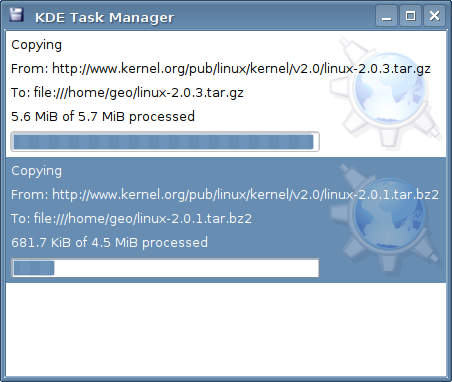
Rafael Fernández López discusses the new kio_uiserver possibilities in KDE 4:
|
In KDE 3, we already had a kio_uiserver, and so there is nothing innovative from that point of view.
The problem with the current uiserver is that it was not really visible from the user perspective, hidden in a Konqueror configuration dialog, and that it wasn't as usable or good looking as users would generally like it to be. Since Qt 4 hit the streets, we came up with a very powerful tool: Model/View programming. The uiserver (kio_uiserver) could strongly benefit from it, by centralising all jobs that are currently running on the computer.
The uiserver works perfectly with current applications, and it is very easy to add support for new features. When creating a KIO::Job, there is usually a parameter that lets you notify the uiserver or not (maybe you want to do some work that the user need not overtly know about). So, because the uiserver is very well integrated with the internal jobs framework, there is no additional work needed for current applications to fit into the renewed uiserver.
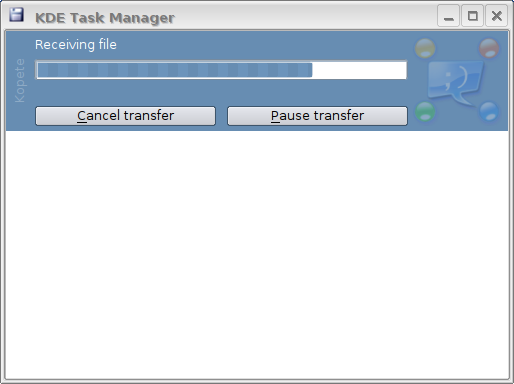
In the KDE 3 uiserver, there were only the typical actions (cancel, pause, etc.), so it was pretty limited in scope. I really wanted to change this, and to make a more flexible and powerful tool for developers. I had two ideas:- The creation of "virtual" jobs should be possible: why only show KIO::Jobs ?
- The addition of new (and unknown) actions was needed, for improving the user experience.
The first idea is because "Jobs" do not do all the work on a computer. When doing some calculations, searching through a large amount of data, or whatever is in progress, something we would like to do is notify the user. This way, using a "for" loop you can update the uiserver to let the user know a task is in progress, and what the app is doing right now, without the need of having a KJob for that.
The second came really as a need because of the first improvement. Different kind of jobs have different needs, and different actions from the user are possible depending on the kind of job being processed.
Now, the uiserver is not a must-have item for KDE 4 (I bet lots of people didn't even notice it was there in the KDE 3 series). The important thing for KDE 4 is that it gives the user a uniform way of looking at what's happening at any moment in the system.
There is a very similiar project for the GNOME desktop too, called Mathusalem. I think that when I have all this stuff working properly, and with all the extras coded and working well I will contact the Mathusalem team, to see if we can co-operate and co-ordinate, letting Mathusalem list KDE jobs, and then of course, enabling uiserver to list GNOME jobs. This is possible because Mathusalem (and GNOME) uses D-Bus too. This would be a great step forward toward the unified desktop.
Here are some crude screenshots that allow you to better visualise the concept and possible implemenation:
|
|
Alexander Dymo reports on the new user interface for KDevelop 4, named "Sublime":
|
KDevelop UI: history The User Interface of the KDevelop IDE has had a long history. The whole goal of the KDevelop UI was always to mimic the behavior of other development environments. KDevelop 1.x and 2.x for example looked like Visual Studio and that UI was good in that the new developers coming from the Windows platform felt at home.
The early KDevelop 3 alphas only used an interface that closely resembled IntelliJ IDEA which had probably the best user interface of the time period. Later during KDevelop 3 development we added three more so-called "UI modes" - "childframe" to resemble Visual Studio 6, "toplevel" that made KDevelop look like Delphi, and "tabbed" which was similar to the UI in the 2.x series.
These UI modes enabled KDevelop 3 to succeed in making new developers feel comfortable in the KDevelop environment. But we've paid a high price for this achievement. Increased UI-related code complexity and unmaintainability of KMDI UI library (the library to give us those four UI modes - Ideal, Childframe, Toplevel and Tabbed) were among the foremost reasons that the KDevelop 3 UI always felt so "unpolished".
KDevelop UI: now This situation had to change, so for the KDevelop 3.4 release we ditched KMDI and used the SimpleIdeal UI mode instead. SimpleIdeal mode was built on top of my "newui" library which I wrote as an experiment to create simple and maintainable UI library with only the most frequently used features (90% of those regular Ideal mode had). As the result, for the first time since the 3.0 release in 2004 we can offer the user interface which doesn't forget your window and toolview settings, which doesn't lose focus and which allows for editor splitting. This made us believe that UI design is clearly a case when "Less is More" works best ;)
The road to the future: Ideal For KDevelop 4 we wanted to keep on the "Less is More" path, and so the first UI effort was the port of newui library to Qt4/KDE4 which I completed and called "Ideal". It used Qt4 mainwindows/dockwidgets and provided a UI look-and-feel that closely resembled the Ideal mode of KDevelop 3. But the Ideal library did not become the foundation of KDevelop 4 UI because the team decided that the new release does not have to look and function like other familiar IDE's and should bring its own, different concept of operation. Since then we had been constantly discussing the modus operandi of this new interface and only at Akademy 2006 in Dublin, in the KDevelop BoF session after extensively looking at the pros and cons of various available IDEs did we make a final decision. This design decision was clarified several times during subsequent IRC discussions.
The future is now: Sublime It was decided that the modus operandi of new KDevelop 4 UI (which I named "Sublime") is the following:- there is a project management window which collects all views not directly connected with code editing in a Finder-like 3-column interface (the closest match would be the project window in XCode)
- UI provides support for "areas" (similar to Eclipse's perspectives)
- the basic set of areas is:
- code editing area with split editor windows (with kate/konqueror-like splitting)
- debugging area (XCode-like debugger window with only one editor view by default but with possiblility to show more)
- profiling area (like KCacheGrind)
- user interface design area (like Qt Designer)
- area configuration includes code editor windows (unlike eclipse)
- each area can be displayed in usual Qt mainwindows with toolviews in dockwidgets
- areas are shown in separate mainwindows so that multiple-monitor setups become the best supported
- one area can be shown in two or more mainwindows by "cloning" the area (unlike Eclipse that pretends that two mainwindows show the same area)
- optionally, areas can be switched inside the same mainwindow without opening new ones (like in Eclipse), but this mode of operation will not be the default
- it is possible to open as many similar toolviews as necessary (for example, several Konsole's)
- it is possible to open several views for the same file in code editor view (unlike KDevelop 3.x)
- instead of tabs for editor windows, a "switcher" is provided (but the design for this switcher is still in progress)
One can think from the description above that the KDevelop 4 UI will still mimic what other IDEs have. This would be only slightly correct. We just took their best ideas, nothing more ;)
So where is the code? The foundation for the Sublime design has begun as the Sublime library now imported into KDE SVN (in the kdevelop/lib/sublime directory). So the new, shiny UI is already not "vapourware" and we'll do our best to finish it soon and present some cool screenshots.
|
|
Next week we will see a surge of activity in the KDE-PIM module, due to the well-known annual pimster-meeting in the beautiful town of Osnabrück in Germany.
The focus of the meeting will be KDE-PIM in KDE4, with such technologies as Akonadi. The meeting will run from Friday 12th to Monday 15th of January, with around 20 core KDE-PIM developers (including Volker Krause, Tobias Koenig, Will Stephenson, Cornelius Schumacher, Tom Albers and Adriaan de Groot) in attendance. The preliminary schedule can be found here.
|
|