|
Plasma continues to mature, with improvements to the Twitter applet (and the creation of a complementary data engine), and the adoption of a common visual style for Plasmoids, and the integration of support for SuperKaramba applets through the creation of the SuperKaramba Plasmoid. More work on the re-implementation of the Magnatune interface within the new music store framework, and integration of the recent Plasma work for Amarok 2. More work on KBlocks, whilst KMines and KLines become the first KDE applications to take advantage of the recently-developed KPixmapCache. More work on colour mixing in Krita. Import of Habitat, a realistic interaction environment, to playground/edu. A return to work on Cokoon, a framework for widget and window decoration creation. RSIBreak, KCall, and the Kickoff menu start to be ported to KDE 4. KDE 4.0 Beta 1 is tagged for release.
|
Craig Drummond presents his recent improvements on the KDE font management interface for KDE 4:
|
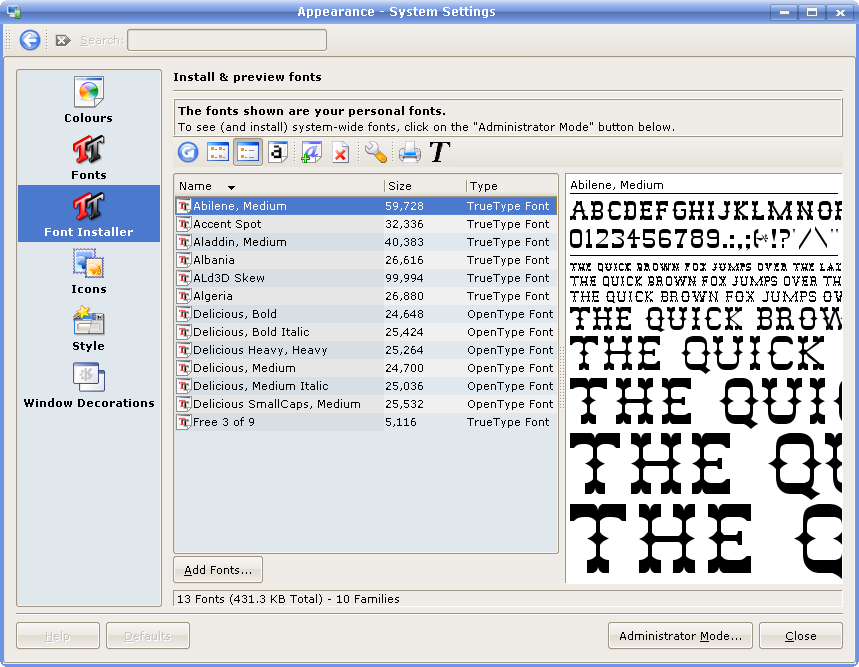
The font installer for KDE3 was mainly limited to the installation, and removal of fonts. However, its user interface never really looked good enough - as you can see from the following screenshot:
In the KDE 3.5 version each family & style combo was given a separate entry - i.e. one for "Times", and one for "Times Italic".
For KDE 4 I wanted to add some simple font management features, but didn't want to overcrowd the interface for the general case of installation and removal. So, when the KDE 4 font installer is started, the user interface appears as:
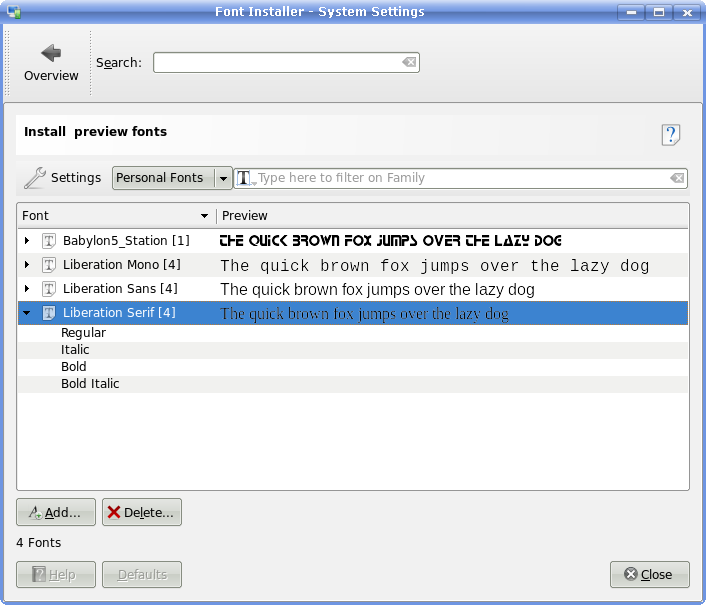
This shows fonts grouped into families - the number in square brackets represents the number of styles. The list of fonts may also be filtered by font family, or font style. The combobox controls whether personal, system, or all fonts are displayed. To install, or remove, system fonts the user would need to select to display "System Fonts", or "All Fonts", and then they will be prompted to enter their password (if the system is using sudo), or the administrator password. This is required, as kcmshell no longer supports an administrator mode.
The "Settings" menu allows the user to enter the font management mode, and this appears as:
In this mode users are allowed to group their fonts, and enable/disable whole groups of fonts, or individual fonts. Fonts that are disabled are simply hidden from fontconfig, but not actually removed. Using this mechanism, you can have thousands of fonts installed, but only activate those you require at a particular time - speeding up application start-up times.
The filter mechanism is also expanded to allow filtering on; fontconfig match, font file location, font file name, foundry, and writing system. The "FontConfig match" filter will allow you to enter "Sans", and the font installer should display the font that fontconfig would use.
The "Tools" menu is intended to house various font management tools. Currently the only tool implemented is one to find duplicate font files. This will look for scalable fonts that have multiple files associated with them, and also look for the case where duplicate files exist in the same folder but differing only in case (e.g. ~/.fonts/times.ttf, ~/.fonts/Times.TTF). The user is then able to select which, if any, font files they wish to delete.
In the future, probably KDE 4.1, I'd like to allow the possibility to download fonts via GHNS, and add a tool to check the validity of fonts. But, for KDE 4.0 I think I'll just try to iron out as many bugs as possible! :-)
|
|
Sandro Giessl introduces Cokoon, a framework to enable easy creation of KDE Widget Styles and Window Decorations:
|
Cokoon is a framework that assists the creation of SVG- and pixmap-themeable applications, such as window decorations, widget styles, or custom widgets. One can think of it as engine for creating theme engines.
The idea of Cokoon is that there are different "Theme Specifications", specifying the interface between the application which uses Cokoon, and the theme. For example, it is defined which "Items" need to be painted (e.g. Button, Frame, ...), and which states those items can be in (e.g. disabled, pressed, hovered, etc).
Themes are there to provide information about how each of these states are going to be painted. Themes are defined in an XML format. There are several data layers involved ("Image Sources" - SVG and pixmap files - which provide data to "Tiles" which are integrated in "Table Layouts"), all interacting with a simple "Expression" language. Using expressions fed with "Variables", it is even possible to have basic conditional theming: styling the SVG graphics according to the active color scheme.
Thus, a lot of flexibility is given to theme creators (our artists!). I believe that Cokoon can eliminate many cases where people currently need to write C++ drawing code.
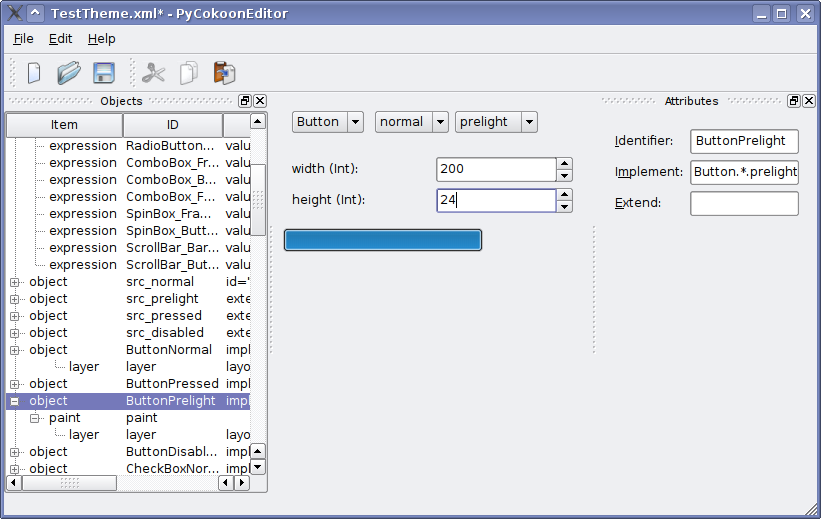
Cokoon's concept of "Table Layouts" has an advantage over current SVG theming practices, which basically take SVG graphic elements and stretch them to fit a specific area. This only works as expected in widgets that grow proportionally in size. Using Cokoon, cases are easily handled where widgets can have various different aspect ratios. For example, in the screenshot one can see how the button edge rounding remains the same while the button can be resized to any size.
Cokoon is in KDE SVN at playground/artwork/cokoon, and currently consists of the following elements:- lib/:
Cokoon library - style/ and decoration/:
KDE widget style and kwin decoration both themable using cokoon themes - PyCokoonEditor/:
Cokoon PyQt4 bindings, and a graphical application aiming at supporting theme developers Currently, almost everything is work in progress, but I hope to stabilize it over the coming weeks.
|
|
Casper Boemann provides an update on the recent restart of the Oxygen Widget Style and Window Decoration:
|
After recently having started over with coding of the Oxygen style, things are progressing rather well. The old code of the style was ditched mainly due to negative feedback from code tested and reviewed at Akademy. Thomas Lübking, the original developer then (quite understandably in my opinion) got up and left. Unfortunately, many of the Akademy reviewers were reluctant to actually help in the effort of improving the code, and so the style was essentially dead in the water. Contrary to my initial reaction, I've now become the maintainer of the new code. The new code is based on KStyle, whereas the old was purely QStyle-based, and I use a lot less hacks to get the style looking as the chief designer, Nuno Pinheiro, has specified.
I have just committed a big chunk of code which provides the Oxygen theming for almost all of the basic widgets. I will not yet certify the code as "done", as there are lots of small bugs and shortcommings that I am fully aware of, for instance, tabs only working in the North position, or the popups of comboboxes not being in Oxygen style at all. But the widgets that are basically done are:- push buttons (but not toolbuttons)
- checkboxes (but not radio buttons)
- comboboxes (but not their popups)
- scrollbar (but only the vertical)
- line edits
- spinboxes
- groupboxes (except for the headline text)
- tabs (only north)
In the week ahead I'll be going over these widgets to try to perfect them, so if any of the readers out there spot any bugs, please come to the #oxygen IRC channel on irc.freenode.net and report. We will however not accept any suggestions or complaints about the artistic side of the style. Everybody has their little thing that they would like to see in the style, but the trouble is that the next person has a totally opposite request, and we have seen the consequences of this first hand. Let's leave the artistic stuff to the artist, please!
|
|
|