prev
Issue 83
4th November 2007
by Danny Allen
next


This Week...
Krushing day concludes with focused bug fixing for the KDE 4.0 release. Work on various "runners" in Plasma, with general work on applets and the addition of binary and fuzzy clocks. Constraints support in the Step physics simulation package. Work on icons across KDE Games applications. Support for the Scalix groupware server in KDE-PIM. Entry editing improvements in KOrganizer. Improved Blu-Ray format support in K3b. Solid gets support for Video(4Linux) devices. Kopete uses Solid for network detection and support of audio/video devices. Various progress across KOffice.

Following on from the menu introductions of last week, Siraj Razick introduces another of the menu options for KDE 4, Raptor:
Vision

One part of the vision of the Raptor team is to create a menu that combines the strengths of 3 ways to launch programs:
  • The overview one has with menus.
  • The speed one has by using console (if one knows the name).
  • The possibilities of the search capabilities a system can offer.
As a launch menu is often used, it is a very visible element of a desktop system. Thus, our vision includes an “eye-candy”, beautiful presentation of this central launch menu.


Aims

We want to make the best menu possible, and allow the fastest possible way to launch applications. We eventually want a menu that is focussed on the user and his tasks, not on the computer and his structure. And we want the menu to find items for us, not look for them ourselves.

Or put shortly: we want it simple, fast, user-oriented and beautiful

Current menus

Since the implementation of KMenu, different launch menu approaches have appeared:
  • KBFX.
  • Tasty Menu.
  • Kickoff.
  • The SUSE Linux Enterprise Desktop GNOME "Slab" menu.
Let's start with KMenu. KMenu's strength is that its concept is well-known. The programs are sorted in a hierarchical structure, and it's basically a menu like the menus in programs. The downsides are quite well-known also: you can lose your position in it by moving the mouse some pixels away of the mouse-path, the mouse-paths are too long, and honestly, it doesn't look very nice.

The four menu types above share one common idea: we have to reduce the distance a user has to move the cursor for faster usage of the launch menu. All 4 do that in the same way: the menu is limited to a certain area, no longer moving out of that area (though SUSE Linux Enterprise Desktop Gnome Menu does it only partially, by not displaying everything and opening a window when you want to see more applications).

So in our view, all of those 4 menus improve the user experience significantly. However, this doesn't go far enough.

Concept of Raptor

To further shorten the mouse paths, Raptor only uses one panel. The idea is that we want to give an overview, but are ready to sacrifice a little bit of it and instead want to interpret the user's past behaviour to calculate what he probably wants.

Search and usage database

This is implemented via a usage database. When a user e.g. searches for “ko” (type ahead, no “enter” necessary), the menu displays it as following, with Konqueror already preselected:
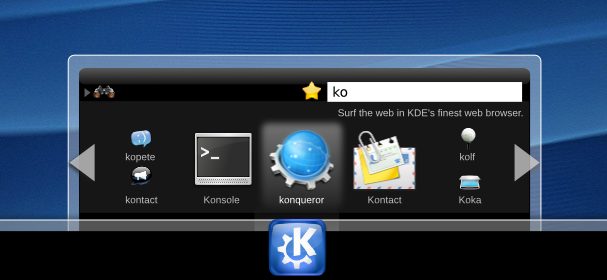

This is because it searches for “ko” and afterwards compares the result with following table (which is very simplified, as I won't describe the algorithms used):

ApplicationRelevance
Konqueror95%
Konsole87%
Kontact86%
Kopete75%
Kolf64%
Kooka58%

So the accessibility of the most relevant items is the fastest, as it's already preselected, and the 3 most relevant items are displayed bigger. The reason to display Kopete, Kolf, Kontact and Kooka as smaller items is to be able to display more items on the restricted area. If further, less relevant items exist, they can be accessed by using the scroll areas.

Browsing

This usage database is also used when browsing, not only when searching. So when a group is selected, the items are displayed according this rule.

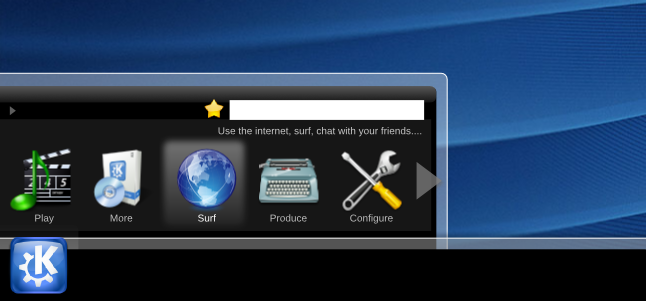
Raptor also uses another approach for grouping the items. The traditional approach is creating categories by asking “what are the programs?” which leads to categories as “utilities”, “office suites” and so on. Raptor's approach is more centred on the question “what does a user want to do?” which leads to categories “Play” (e.g. music, videos, slideshows), “Configure”, “Browse” (e.g. the web, the filesystem and so on) and “Produce”. As indicated before, the items are prioritized by means of the usage database and then arranged accordingly.

In the upper left corner of the menu one always sees where one is currently in this structure.
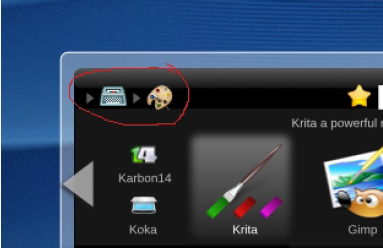

By clicking on the parent group (here the typewriter for “Produce”), one always changes back to the content of that group. As alternative, one could also just click the “up” arrow to change into the parent category.

Favourites

I think one can safely say that every user has a set of “favourite” applications. For me, those are Firefox, Kopete, OpenOffice.org Writer and the GIMP.

In Raptor, those favourites are represented by the yellow star. When I'm in “Draw”, I can drag-n-drop the Gimp icon onto the star and thus add it to the favourites.

By clicking the star, the content in the panel changes to my favourite applications.

Position on the desktop

As you might have noticed, all these pictures show Raptor on the bottom and centred. This – of course – is not the only possible position for it. Of course one is able to select the way it is aligned. We just liked the balance of having it in the middle, but you are free to place it in the lower right corner, as you might be used to do.

State

Now we come to the current state of Raptor: not finished. Our team is quite small, so if someone wants to join us, feel free to contact Siraj Razick to get a more detailed view on the open issues. Siraj is on the panel-devel mailing list.

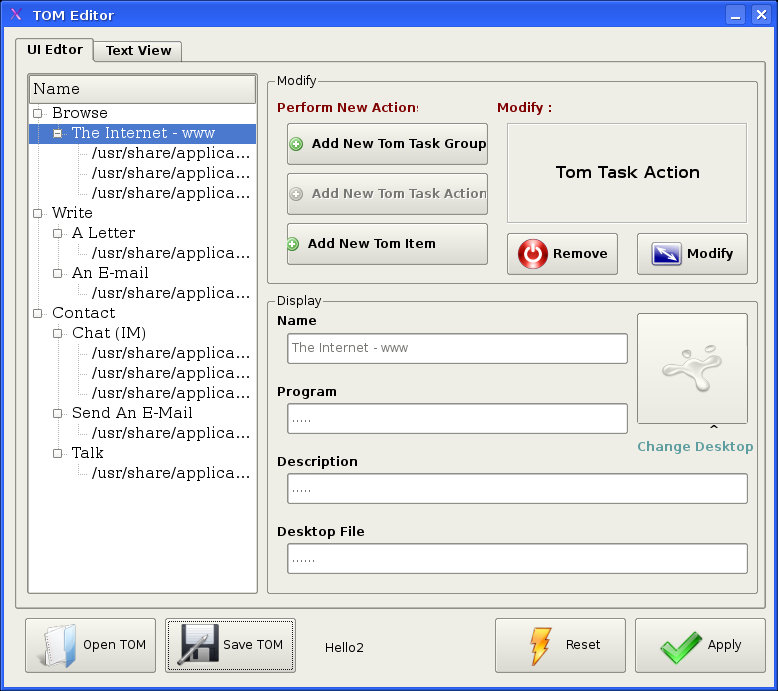
Two plugins, applications (for the traditional grouping of apps) and TOM (Task Oriented Menu, including an editor for grouping without restructuring the applications for other menus) are pretty much done. A part of the presentation is ready, too.
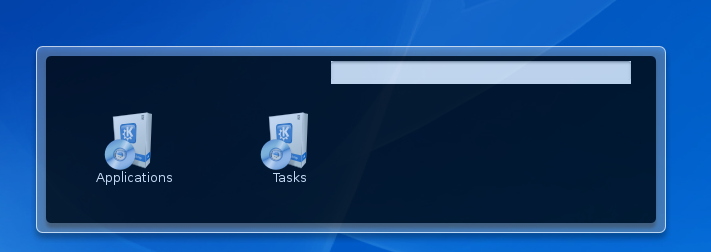

The usage database is not yet implemented, and the favourite applications part is still open. A further plugin for disks/CDs/USB-sticks etc. is planned, but work hasn't yet started there.

Thank you for your interest.

Allen Winter announces another upcoming development in the KDE 4.0 release schedule:
Howdy,

For planning purposes, we thought you'd like to know that the next Tagging Freeze is coming Tuesday 13 Nov at midnight.

The freeze is to make life easier for the tagging of the next Development Platform release and only affects:
  • kdesupport
  • kdelibs
  • kdepimlibs
  • kdebase/runtime and kdebindings.

The application modules (kdepim, kdenetwork,etc ) are not covered under this particular freeze.

So, plan accordingly.

Regards,
Allen, KDEPIM Release Dude


Statistics
Commits: 2377 by 239 developers, 7968 lines modified, 1067 new files.
Open Bugs: 14946
Open Wishes: 13256
Bugs Opened: 312 in the last 7 days.
Bugs Closed: 178 in the last 7 days.

Commit Summary
Module Commits
/trunk/KDE
912
/trunk/l10n-kde4
450
/trunk/koffice
205
/trunk/extragear
160
/trunk/playground
111
/trunk/www
106
/branches/work
80
/branches/extragear
75
/branches/stable
67
/trunk/l10n-kde3
57
Lines Developer Commits
47
Allen Winter
108
233
Pino Toscano
103
136
Laurent Montel
83
116
Volker Krause
77
185
Gilles Caulier
75
147
Oswald Buddenhagen
70
68
Thomas McGuire
63
179
Aaron J. Seigo
62
137
David Faure
60
33
David Jarvie
58

Internationalisation (i18n) Status
Language Percentage Complete
Portuguese
99.56%
Swedish
99.34%
Greek
99.33%
Japanese
94.87%
German
89.31%
Chinese Traditional
86.76%
Spanish
84.44%
Dutch
84.35%
Brazilian Portuguese
80.95%
Estonian
78.33%

Bug Killers and Buzz
Bug Killer Number Of Bugs Closed
Thomas McGuire
23
Aaron J. Seigo
17
Seb Ruiz
15
Oswald Buddenhagen
14
Tommi Tervo
13
Pino Toscano
12
Pierre Ducroquet
12
Gilles Caulier
9
Peter Penz
7
Lukas Appelhans
7

Program Buzz
Amarok
  6305
K3B
  5640
KMail
  5120
Kopete
  4330
Kontact
  3948
Kate
  3880
KDevelop
  3205
digiKam
  2798
Kicker
  2436
SuperKaramba
  2154


Person Buzz
David Faure
  856
Sebastian Kügler
  854
Stephan Kulow
  771
Matthias Kretz
  654
Adriaan de Groot
  630
Allen Winter
  629
Waldo Bastian
  440
Aaron J. Seigo
  364
Boudewijn Rempt
  340
George Staikos
  322
Commit Countries

Commit Demographics
Sex
92 %       Male
6.88 %       (unknown)
1.21 %       Female
Motivation
52.7 %       Volunteer
30 %       (unknown)
19.3 %       Commercial
 
Ages
75.0 %       (unknown)
22.3 %       25 to 34
13.5 %       18 to 24
6.79 %       45 to 54
6.74 %       35 to 44
0.145 %       Under 18


Contents
  Bug Fixes Features Optimise Security Other
Accessibility
Development Tools [*] [*]
Educational [*] [*] [*]
Graphics [*] [*]
KDE-Base [*] [*] [*] [*]
KDE-PIM [*] [*]
Office [*] [*] [*]
Konqueror [*]
Multimedia [*] [*]
Networking Tools [*] [*]
User Interface [*] [*]
Utilities [*] [*]
Games [*] [*] [*]
Other


Bug Fixes
Development Tools
Andreas Pakulat committed a change to /trunk/KDE/kdevplatform/plugins/classbrowser/kdevclassbrowser.desktop:
Fix the .desktop file to load the class browser. One can't just make up properties, you have to use those that KDevelop knows about and that are associated to the category you chose.

The profile-system needs work.
Diff Revision 730791

Educational
Jason Harris committed changes in /trunk/KDE/kdeedu/kstars/kstars/data:
Fixing bug #151206: updating ephemerides for comets and asteroids.

The new ephemerides are also available via the "Get New Stuff" action.
I am not porting to the 3.5 Branch, because it would break the strings freeze. 3.5 users can simply use the GNS action.

TODO: make the file-parsing code more robust so that the comets dat file can be used as published by JPL, without formatting changes.
This used to be the case, but JPL changed the widths of their columns, which breaks ouur fragile column-based parser.
Bug 151206: updated comets.dat has 1094 new entries (old one had 1355, now 24...
Diffs: 1, 2 Revision 730537

Anne-Marie Mahfouf committed changes in /trunk/KDE/kdeedu/khangman/src:
the timer config is now applied on "Already Guessed" tooltip
don't start a new word after applying config
remove obsolete comments

Thanks to jstubbs4 on IRC #kde4-krush for testing!
Diffs: 1, 2 Revision 732068

Albert Astals Cid committed changes in /trunk/KDE/kdeedu/kgeography/src:
krushing day
Use a zoom icon when zooming, that fixes "Selecting zoom when placing state on a map leaves the cursor as the state to be placed"
Diffs: 1, 2, 3 Revision 732314

Games
Pierre Ducroquet committed changes in /trunk/KDE/kdegames/konquest:
This is a fix for the bug #149411 (Multiple planets are blinking when selected by keyboard)

The problem was that the selected planet wasn't remember when selected with the keyboard, but this code is quite complex (too many objects doing their own work apart), it'll have to be cleaned up later.