|
| This Week... |
|
Amarok 2 gets basic video playing support, and a connection to Librivox public domain audio books. Major porting to KDE 4 continues in K3b. More work on "Fuzzy Search" integration in Digikam. The start of support for sound effects in KGoldRunner, and the addition of a sound feature in KPresenter. Improvements in the msword-odf and kpr-odf import facilities in KOffice. Start of QTestLib integration into KDevelop. The Ruby development bindings support interaction with Akonadi. KMPlayer gets a bookmarks menu and support for displaying Phonon metadata. Kst replaces the concept of tags with "dynamic names". A new, improved version of KColorEdit is imported into KDE SVN. A new module, kdeplasmoids, is created in KDE SVN to consolidate the various different scattered locations of Plasma applets. A new Plasma theme for KDE 4.1 is unveiled in KDE SVN. All of Eigen no longer depends on Qt. KDevelop 4.0.0 Alpha2, Phonon 4.1.0, KOffice 1.9.95 Alpha 8, and KDE 4.0.5 are tagged for release. Phonon moves to kdesupport. guidance-power-manager moves to extragear/utils to be released with KDE 4.1.
|
John Layt talks about the reintroduction of the advanced printing options (known in KDE 3.5) back into the KDE 4 series:
|
One of the great features of KDE3 was the brilliant support for printing provided by Michael Goffioul’s KDEPrint library, which gave KDE probably the best print support of any platform. It was one of the two reasons I quickly switched from GNOME to KDE (the other being KFileDialog). For KDE4 we were forced to drop KDEPrint due to various technical issues, the need for cross-platform support, and a lack of manpower to work on a seriously un-sexy part of KDE. The decision was eased by the steady improvements to printing support in the QT4 series, and especially by the Trolls promise to address many of the remaining issues in Qt4.4. A word of thanks should go here to Thomas Zander and Thiago Macieira for making this happen. With the Qt4.4 now out, I’ve been working on filling in a few of the gaps.
So where are we at at? KDEPrint could be broken into 3 parts, the underlying library for communicating with the supported Print Systems (CUPS, LPR, etc), the Application Support (Print Dialog, Print Engine, etc), and the Print System Management (add printer, job viewer, etc).
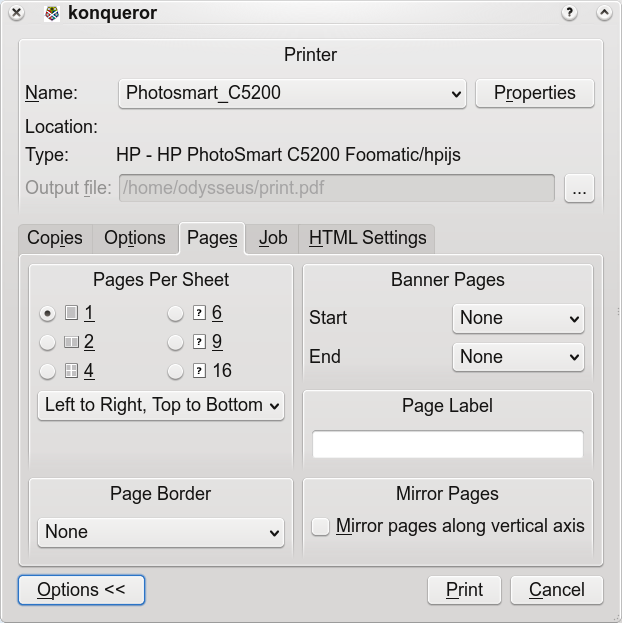
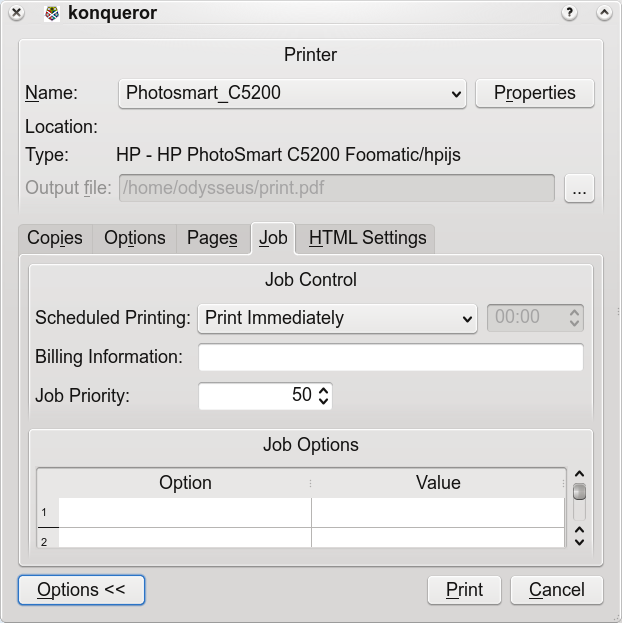
Application support is where we have switched to dependence on Qt for the Print Dialog, Print Engine, and submitting jobs to the underlying Print Systems. Qt4.4 has seen the addition of a reworked QPrintDialog for UNIX that bears an uncanny resemblance to the KDE3 one, official support for extending the dialog with our own options, and new features in the Print engine such as improved support for duplex and margins. A number of features haven’t made it into Qt 4.4, some of which we will have to work towards being included in Qt4.5, but some of which we can add to QPrintDialog when printing through CUPS. Below are screenshots of the support I’ve added for various Page and Job options. There's still a bit of polishing work to do, and I'd welcome some new icons for n-up printing similar in size and style to the Colour Mode icons on the Options tab.
Print System Management for UNIX is still a problem that needs solving. I had planned to work on KDEPrint for inclusion in 4.1, but haven't had the time, so sadly there will be no resurrection of the famous KPrinter utility this release. Instead, for 4.1 Jonathan Riddell has added printer-applet into kdeutils, a port of Red Hat's system-config-printer tool, to cover some of the missing functionality, itself a milestone of sorts in being the first Python app to be included in the main KDE modules.
Longer term, the future of KDEPrint is uncertain, especially with many distributions continuing to implement their own Printer Management tools. On the application side, there's an interesting collaboration between OpenPrinting and OpenUsability for a unified printing dialog with a Google SoC 2008 student attempting a first implementation.
|
|
Gilles Caulier and Marcel Wiesweg talk about the new "Fuzzy Search" in digiKam:
|
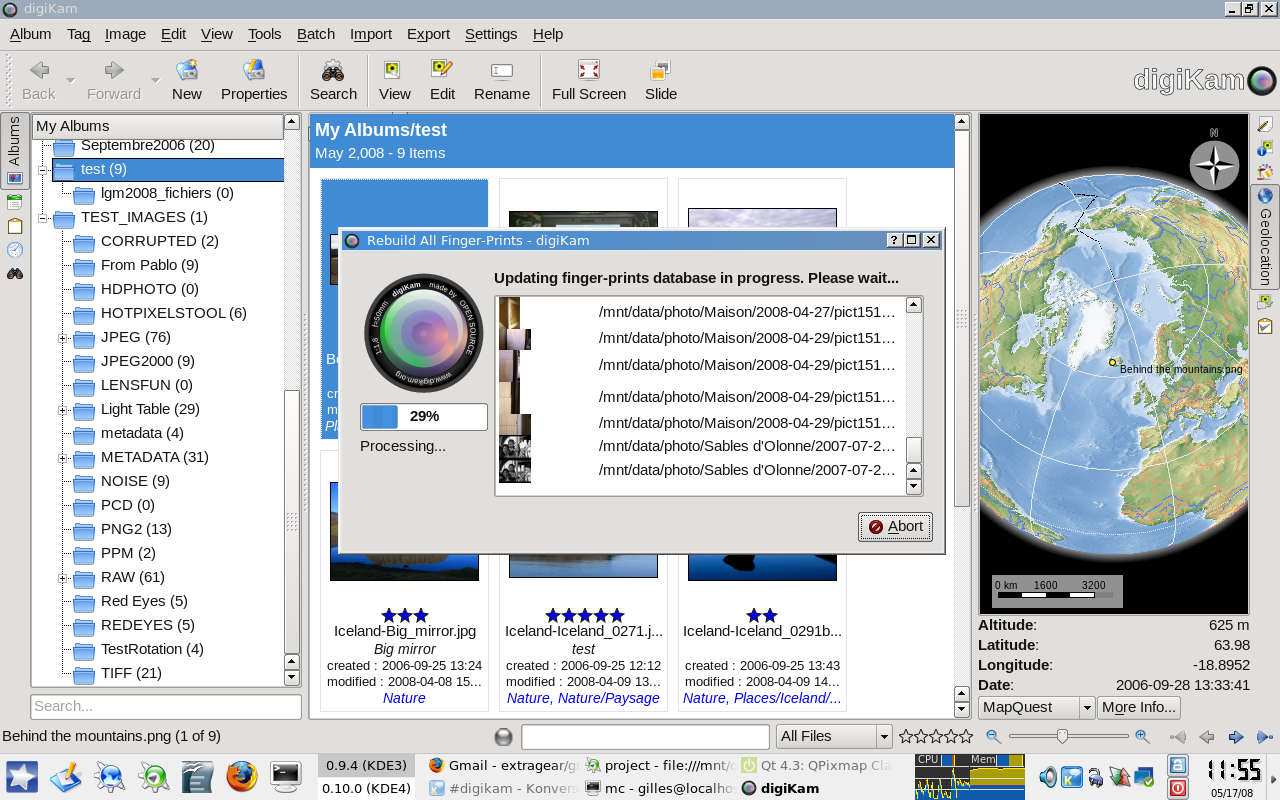
Fuzzy searches are a collection of tools to perform image searches over whole image collections using Haar wavelets fingerprints. You can find similars images using a hand-drawn sketch or any other image as reference, or perform a search for duplicate images.
The current Haar algorithm has been taken from imgSeek program (http://www.imgseek.net). We have rewritten the code to be more C++ like, and interfaced fingerprint computation/queries with the digiKam database (imgSeek uses a serialised binary file as database, not a real SQL database as digiKam).
In the current implementation of digiKam three new tools have appeared:
- A batch fingerprints generator to scan whole collections and record/update all Haar fingerprints to digiKam's database.
- A new Sketch editor to query the database and find images which are similar to a drawn template.
- A new Image Similarity Search tool. You can drag and drop an image from your collection to this area, and digiKam will search all relevant similar images. Instead of using drag and drop, you can also use a new menu entry named "Image/Find Similar".
For both tools, results can be saved in the digiKam database as new virtual search folders.
There are several pending development jobs:- Generating fingerprints on the fly, for example, when we create a new image from an editor or when new images are imported from a camera. Currently, fingerprints need to be generated manually using the batch tool.
- Creating a new tool to find all duplicate images stored in the whole collection (like the Tools/Find Duplicates menu entry). This tool will create a map of images when duplicates are found. The GUI will be composed of a list of main images which have duplicates. This list will be hosted in a new tab named "Duplicates" from the "Fuzzy Search" sidebar. When the user selects an item from the list, the icon view will display all relevant duplicate items. From the icon view, the user can of course delete all unwanted items.
- No accuracy info is displayed in the icon view about the relevance of items found with a database query. This requires a lot of changes in the icon view implementation and this will be done after the 0.10.0 release. In fact our current icon view implementation still uses the Qt3 transition classes and pure Qt4 model/view implementations need to be done instead.
Me and Marcel have worked on these implementations over the last 2 weeks. These tools are already suitable as well. Of course, all reports are welcome to improve usability. Some finetuning will be done to the Haar algorithm to optimise searches. All "Fuzzy Searches" tools must be finalised for digiKam 0.10.0.
I'm so surprised by the speed of this tool to query all image fingerprints from database. It's very fast, but sometimes, especially using Sketch tool, the results are a little bit strange...
The paper which describes the "Fast Multi-Resolution Image Querying" method can be seen here: ftp://ftp.cs.washington.edu/tr/1995/01/UW-CSE-95-01-06.d/UW-CSE-95-01-06-color.ps.gz
|
|
For those who don't read the selected commits section of the Digest, Eike Hein makes a brief statement about the future development of Konversation in this commit.
|
|
| Statistics |
|
| Contents |
|
|
Bug Fixes |
Features |
Optimise |
Security |
Other |
|
Accessibility |
|
|
|
|
|
|
Development Tools |
|
|
|
|
|
|
Educational |
|
|
|
|
|
|
Graphics |
|
|
|
|
|
|
KDE-Base |
|
|
|
|
|
|
KDE-PIM |
|
|
|
|
|
|
Office |
|
|
|
|
|
|
Konqueror |
|
|
|
|
|
|
Multimedia |
|
|
|
|
|
|
Networking Tools |
|
|
|
|
|
|
User Interface |
|
|
|
|
|
|
Utilities |
|
|
|
|
|
|
Games |
|
|
|
|
|
|
Other |
|
|
|
|
|
|
There are 150 selections this week.
|
|
Bug Fixes |
|
Games |
|
Ian Wadham committed changes in /trunk/KDE/kdegames/kgoldrunner/src:
|
The sound feature is written and working, but is temporarily disabled until final testing, including testing the playing of simultaneous sounds in Phonon.
This fix disables the Settings action for sound. |
|
|
|
|
|
|
|
|
Jos van den Oever committed a change to /trunk/kdesupport/strigi/src/xsd/CMakeLists.txt:
|
Fixed CMakeLists.txt to generally properly generate the io code files. If no java is present, then the pregenerated files from svn are copied to the build directory to be used.
Tips from Alexander Neundorf:
I just tried to build kdesupport out-of-source on a MacBook. It failed in strigi/src/xsd/ because it couldn't find metadataproperties.cpp
I had a look at the cmake file and found a few things, see the attached patch.
In general, while it may save some typing, getting input file via GLOB is no good idea. They will only be picked up when cmake runs again (which doesn't happen by just adding the file in the directory), and at that point in time there might be other files around which are then also found.
There was a if(JAVA_COMPILE AND ... IS_NEWER_THAN ...) ... ADD_CUSTOM_COMMAND(...)
This doesn't seem to make a lot of sense. If at cmake time some file is newer than another one, a rule is added which depends on this newer file.
This means this rule will not exist if that condition wasn't true at cmake time. I removed that second part of the if so the rule now always exists and is executed if required.
If you want it purely at cmake time than the test with the IS_NEWER_THAN is ok, but then you probably want to run the command via EXECUTE_PROCESS (which is also done at cmake time), not via ADD_CUSTOM_COMMAND (which will be executed at build time).
Then the files were generated into the source directory. In general files which are generated should always go in the build dir, so that removing the build dir really removes everything. I modified the CMakeLists.txt accordingly. Then I noticed that these generated files are actually in svn. Why? If this is the case and if that has to be, then generating the files into the source dir is probably ok, but I have the feeling that it should be done at cmake time then, not at build time.
To get the dependencies right, it is usually a good idea to use the full path to files in custom commands, I did that. Also I replaced the STRING(REPLACE) with GET_FILENAME_COMPONENT(), which does just what you want. |
|
|
|
|
|
|
|
|
|