KDE Commit-Digest
The current system tray consists of only three fairly fat classes. So far, my rewrite consists of a three class abstraction layer, five classes for the FreeDesktop.org systray specification implementation, and three classes for the UI. Not that more classes is necessarily better, but in this case each class has a clear and concise purpose - which should make maintenance much easier.
My main goals with the rewrite are to solve (or at least make solvable) all of the current systray wishlist items on bugs.kde.org. To itemize them:
- Support a new systray spec alongside the existing one (infrastructure done)
- Support icons of arbitrary sizes (done)
- Make the system tray appear on the dashboard (done)
- Ability to have more than one system tray (done)
- Make displayed icons configurable (not started)
 |
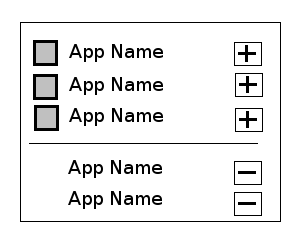
Next up is adding configuration to the applet. I'm planning to add a button to the applet that pops up a small window in a similar manner to the new device notifier. As shown in the mockup, selected icons and available icons will be displayed separately, with buttons allowing to change the status of a particular icon. Icons that aren't shown in the tray will be able to be interacted with directly from the "configuration" popup.
 |
In the future, I hope to move the abstraction layer and FreeDesktop.org specification implementation into a separate library so that creation of other system tray applets is possible. It would also be nice to get a new specification that works well with QGraphicsView completed in time for KDE 4.2, but that's definitely not something I'll be doing on my own!