Alessandro Diaferia introduces a new
Plasmoid, "Previewer":
I started this project just to learn something more about Plasma API's and now i'm seeing it grow a lot.
The Previewer is just a "multi-functional" Plasmoid that allows you to have a quick look at the files on your PC. Since it makes use of the KParts technology, its capabilities strictly depend on the KDE software you have installed. The main aim of this little Plasmoid is to avoid opening lots of windows of big applications - especially if you just have to quickly read or compare text files, have a look at images, or other trivial tasks... A quick example: you have just installed a software you've never used before. It gives you documentation and installs instructions in three different files you have to read to configure/setup your application on the terminal. Then just "preview" the text files and easily switch among them using the always-on-top dialog. Then you can close them with one-click when you finish!
Currently, when you add Previewer to your desktop, it looks like this:
The icon is kindly provided by Nuno Pinheiro (thanks Nuno!). By the way, I suggest letting the Previewer applet stay on your panel :).
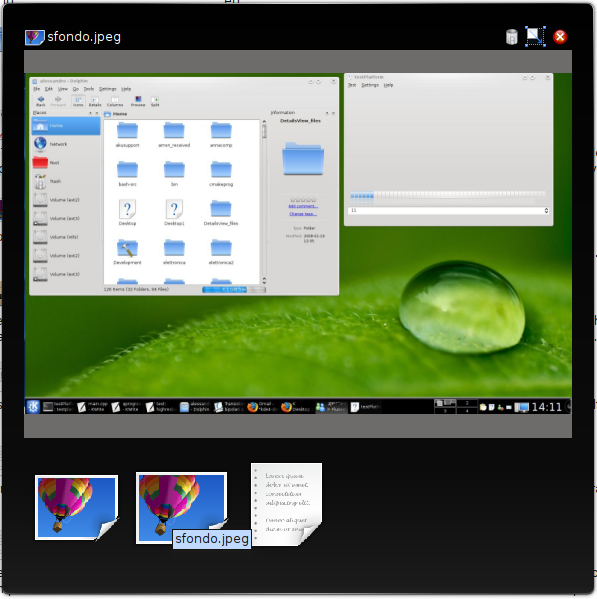
The Previewer keeps track of your recently opened files by using a horizontal icon list on the bottom of the dialog as you can see here:
So you can easily go through your recently-previewed files just by clicking on their icons in the bottom list. The last bit I worked on was the behaviour when handling folders dropped onto the applet. Before, Previewer only did what KParts suggested for folders - it just opened the folder using a file view...
Now, the Previewer tries to recursively open every file in the dropped folder (including its subfolders). The result is just the "populating" of the bottom list with the file icons in the folder. This behavior needs some polishing, since there is no distinction between "normal" files and "belonging-to-dropped-folder" files. I will have to think about this :).
Since the Previewer makes use of Plasma::Dialog to show the KPart, we needed to add some features to handle the dialog more easily. The Plasma::Dialog cannot be considered a "real" Plasma component since it is just a themed widget with Plasma::Theme's SVG's. This means that the dialog isn't an applet and does not come with easy-to-use resizing/moving handlers :). So I needed to implement them (waiting for an always-on-top Plasma::Applet). But, even if the moving of the dialog is now easy and fast, the resize is damn slow and awful... As you can see on the top right corner there is a resize icon: you need to click and drag over that icon to resize the dialog. This causes a slow (really slow) resize of the dialog (with my Nvidia graphics card, the resize is long and boring!). So, I hope to have a good idea to solve this in the near future.
Moreover, the trash icon means "remove this file from Previewer's history", but someone said this was not so clear and maybe would be better if that meant "remove this file from your disk". I also need to think about this :). This Plasmoid comes also with a nice D-Bus interface (minimal, but still useful). Thanks to
Fabrizio Montesi, I could make some D-Bus methods to allow integration with his
JOLIE framework, you can have a look at his blog for news about that. And last but not least, thanks to [person4] the Previewer is now integrated in Dolphin. Just by hitting the spacebar when selecting files you can have them previewed in the Previewer. Cool, huh?
In the near future, I hope to solve the issues I have talked about. Moreover, I have to gather some ideas about making the current previewed file "detachable". This means that you can have, if you wish, one dialog per file. Maybe a "detach" button could allow this. And then a configuration dialog would allow to choose which dialogs are kept visible, always on top, etc...
Another nice feature would be having a native media player in the Previewer, since the ones with KParts are not so pretty (video does not work for me, and audio comes with no handlers: so no play/pause controls, etc).
Hoping to become stable and usable soon, the Previewer will probably be moved to kdebase. Until then, you can checkout it from here: http://websvn.kde.org/trunk/playground/base/plasma/applets/previewer.